Home
Download
Buy Now/Get It Free
Contact
 
Video Software
Naturpic Video Cutter
Naturpic Video Joiner
Naturpic Video Converter
Naturpic Video to MP3
 
Audio Software
Naturpic Audio Editor
Naturpic Audio Toolbox
Audio File Cutter
Small WMA MP3 Converter
Hotkey Sound Recorder
CD to WMA MP3 Ripper
Naturpic Audio CD Burner
All2WAV Recorder
 
Graphic Software
3D Real Boxshot
High Quality Photo Resizer


How to record sound on Windows 7
   

Click to enlarge

Download

(2.36 MB)


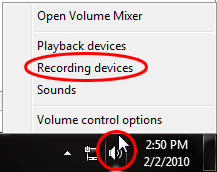
Step 1: Right-click the systray icon 'Speaker' and select 'Recording devices'.


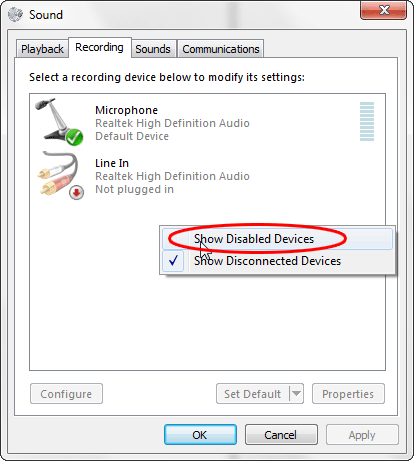
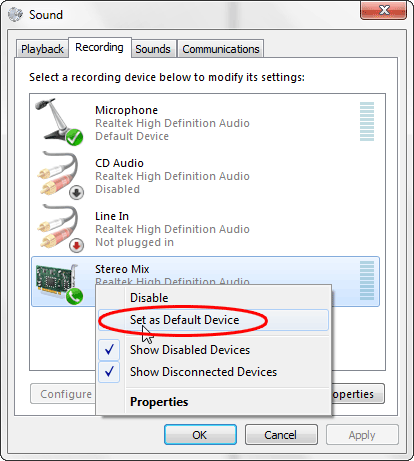
Step 2: On the 'Recording' panel, right-click and select 'Show Disabled Devices'.


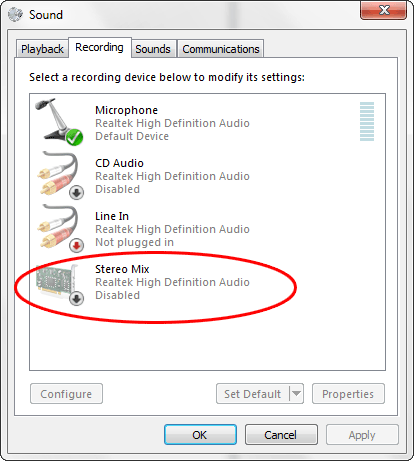
Step 3: Now you will see new devices, the name could be 'Stereo Mix', 'Sound Mix' or 'WAVE Mix', etc. In this example, the device name is 'Stereo Mix'.


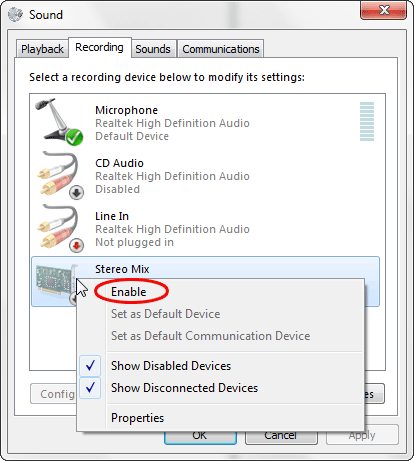
Step 4: Right-click 'Stereo Mix' and select 'Enable'.


Step 5: Right-click 'Stereo Mix' again and select 'Set as Default Device'.


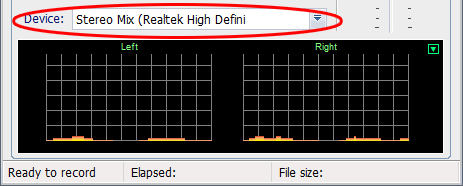
Step 6: Run All2WAV Recorder, set the device to 'Stereo Mix'. Now you may record any sound being played on your computer by All2WAV Recorder!


© 2003-2010 Naturpic Software